

Opis
RME Advanced Remote Control jest opcjonalnym akcesorium dla Fireface UFX i Fireface UCX.
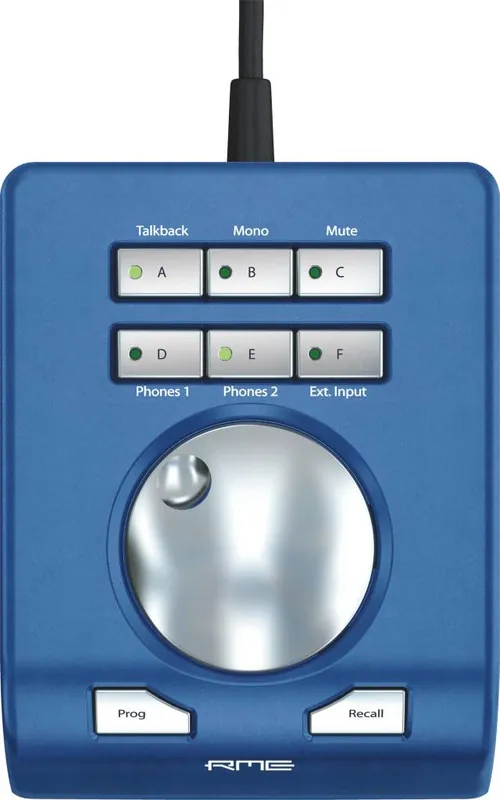
Łączony przewodowo ARC został zaprojektowany do bezpośredniego dostępu do najczęściej używanych funkcji i poleceń wykorzystywanych w codziennej pracy studyjnej. ARC to solidna metalowa obudowa z głównym enkoderem obrotowym oraz ośmioma przyciskami, w tym 6 z diodami LED. Siedem przycisków ARC może być dowolnie przypisana poprzez TotalMix FX dla ponad 36 różnych komend.
Dane
– przewodowy opcjonalny kontroler dla wybranych interfejsów RME,
– działa z Fireface UCX oraz Fireface UFX o numerze seryjnym równym lub wyższym 23241707.
Opis i Dane Techniczne ze strony producenta:
Advanced Remote Control (ARC)
Overview
This wired Advanced Remote Control (ARC) has been designed
for direct access to the most frequently used actions and commands required in a studio’s daily work.
Its extremely flexible configuration through TotalMix FX will simplify the workflow and greatly increase
the usability of the RME interface in any real world situation.
* The Advanced Remote Control (ARC) can be used with all Fireface UCX. It can also be used with all Fireface UFX with
a serial number 23241707 (built after June 2011) or higher.
Upcoming interfaces that feature an Advanced Remote Control connector will also be compatible.
Users that own a Fireface UFX with a serial number below 23241707 have to send their UFX to their distributor
as it requires a hardware modification to be fully compatible to the Advanced Remote Control. This modification is not free of charge.
The ARC consists of a solid metal case with a main encoder dial, 2 push buttons and 6 LED-equipped buttons.
The Remote Control connects to the main interface via a 5 m (16.4 ft.) cable and a special connector on the back of both units.
Supported Features
The top of the Advanced Remote Control features a rotary encoder with push switch function,
2 lower buttons, and 6 upper buttons with Status LED.
The rotary encoder is used to change various parameters, like gain and volume.
The left button Prog is programmable, and can perform several functions.
The same is true for the upper 6 buttons, which also include a status LED to signal the current state.
The ARC provides default settings for the 7 programmable buttons,
but can be freely configured via the Key Commands dialog of TotalMix FX.
All buttons can be assigned to more than 36 different commands.
The behaviour of each individual button can be changed between push, toggle, enable and disable, depending on the base function.
Available commands/actions (examples):
Main Volume
Global Mute
Global Solo
Mute Group 1 to 4
Solo Group 1 to 4
Fader Group 1 to 4
Link Main AB
Speaker B Select
DIM (Main Out)
Mute (Main Out)
Mute FX (Main Out)
Mono (Main Out)
External Input
Reverb
Echo
Cue Phones 1 to 4
Snapshot 1 to 8
Mic Gains
Inst. Gains
Volume Phones
Several functions can be activated at the same time.
Example: Button A is set to Cue Phones 1.
That means the phones submix is heard via the Main output (the studio monitors).
Now to be able to also change the volume of the phones submix itself, set button B to Volume Phones 1.
Activating both will allow you to listen to the phones submix via the main output,
and also to change its volume (the fader in the third row) by turning the encoder knob.
In stand-alone mode of Fireface UCX and UFX there is no TotalMix FX on the host computer.
Therefore the settings for the ARC are no longer available. Instead a fixed set of functions is activated:
Turn Encoder: Main Out volume
Push on Encoder: Dim for Main Out
Recall button: Recall function for Main Out
Prog: no function
Buttons A to F: load Setup 1 to 6